Who is this for?
This document is intended as a foundational baseline for most simple network implementations where multiple users, services, and access to/from the internet is expected to exist for business-like purposes.
This basic design is applicable for “home lab” scenarios and for personal and community learning purposes. A strong bias towards Opensource software is intended (and shown where possible) to allow an inexpensive yet professional implementation with personal and non-profit usage.
Why do this
Having a safe environment to explore and experiment within makes learning much easier, more effective, and considerably more valuable. Having an environment that is also one that you use on a daily basis and actually somewhat rely upon, makes it much more likely that you will notice issues and critical nuances of configuration that can lead to important learning moments that a typical classroom setting just can not simulate. Making it inexpensive lowers the barrier to entry and allows a wider base of collaborators and peers to join in the learning.
Perfection is NOT always what you think it is
Do not go into this project thinking that you are going to create the most perfect network, devices, and lab imaginable. In fact - assume that you are making a “manageable mess” that allows you to learn and explore with safety and near complete abandon. In other words - have fun with it!
Overview
Step 1 - Document EVERYTHING!!
I will use Obsidian for this. You might want to do so as well. It is a very easy to use note taking application and can be extended to the universe and beyond! (We will also cover this application and it’s capabilities in more depth in other documents and sessions) Why document? Memory is a curious and fickle thing - and collaboration is easier when you can share tangible content. I highly recommend looking at my dear friend Vivian’s documentation on creating an Obsidian managed, Github hosted, free, public journal.
Step 2 - Acquire the Basic Hardware Components
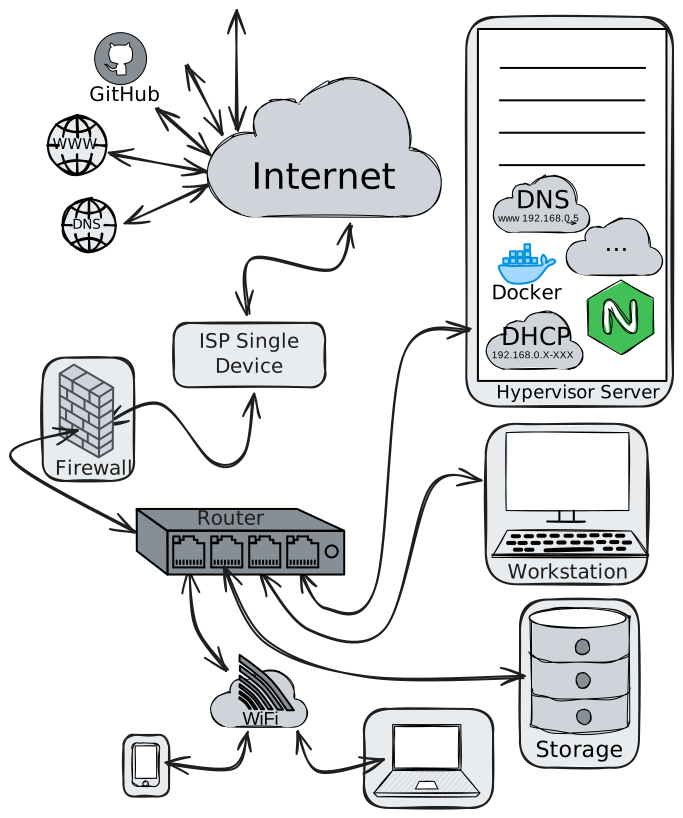
Beyond the obvious cabling and individual system’s LAN network interfaces, we will require the following:
- A Modem/internet-interface with service to the internet (aka an ISP)
- Router
- Firewall
- WiFi Access point
- DNS server
- DHCP server
Residential Internet Customers
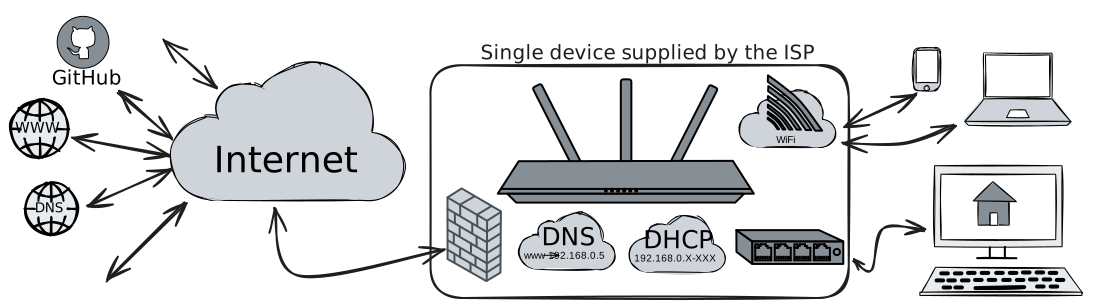
In most residential environments, you will find all of these in a single device that is installed by the ISP (see the relevant diagram below). We will, ultimately, want to have individual devices/services for each purpose. However, we can create or add these later, as we progress towards our goals.
Other hardware that will be needed:
- One (or more) user stations (i.e. laptops, desktops, etc)
- One (or more) Hypervisor server (we will use Proxmox - for VMs, LXCs, Docker, etc) (supporting VT-X or AMD-v and hyper-threading)
- NAS with ample storage. One is good, two is better.
Step 3 - General Design Concepts
Static IP
Static IP is a nice to have, but not a requirement. It can certainly make it a little easier to access your home lab remotely, but we can still achieve reliable remote access using things like Tailscale - even without it.
Before we start putting any real effort into this plan for a home lab, we need to set the stage with some basic foundational assumptions.
- Security - at every layer, starting from the router and all the way to your apps and documentation.
- Firewall should be default-drop-all for all outside access and intentionally modified (with versioning control) to allow specific services through. External logging to a monitoring/alerting solution such as Grafana is an absolute must. Internal rules can be more open.
- Basic network design should include provision for separation between network environments. For example the WiFi access should be entirely isolated from the infrastructure services. The infrastructure services should be accessed through a proxy and only directly available from within their own physically isolated network. A shared physical layer with multiple routed traffic is not enough.
- Good passwords, MFA, and tokens where possible.
- Reduce your bandwidth usage replication as much as possible (get your money’s worth)
- Caching and proxiesshould be used to minimize system updates impact on bandwidth.
- One source of truth - always try to keep a single “source of truth” rather than replicate documents in multiple locations where information schisms can occur without being noticed.
Temporary is the most permanent thing you can do
Avoid, at almost any cost, making “easy” and “temporary” solutions that become embedded and intractable later. This has brought more tears to more system administrators eyes than any other mistake you can make. Always be thinking, how hard will it be to replace or upgrade “this” later? If there is a more flexible answer that still achieves the goal at the moment, it may be the best option - but so might be simply taking the time to implement what you actually need the right way, right now.
Step 4 - Consider Additional Support Services
These are things to be created/made-available as we go, and are not immediately necessary. That said, keep these in mind.
- Password manager (this is very important!!)
- A Version control system (can be externally hosted - i.e. https://github.com, https://gitlab.com, etc)
- Backup service and storage (can be externally hosted - best if it is local at first though)
- Apt cacher for Linux systems
- Network Storage for persistent data
- Network & Resource Monitoring (grafana, prometheus, cadvisor, etc)
- Docker manager (Portainer)
- Email (external - for now)
- Website (MANY choices)
- Collaboration hub (CouchDB for LIve Sync with )
- Internal DNS (split DNS) should be available to the LANs and set as default in the [DHCP settings to allow easier access to systems that will not be available to the Internet directly (i.e. the many DHCP addressed systems, which should be in specific zones and not able to conflict with infrastructure)
Lets Get Started
Lets assume that you are using a standard residential ISP access with the supplied “router” that is an “all in one” device. This is the typical scenario for most people. There are some drawbacks to this environment, but we can augment the basics and overcome the barriers. Your network might look something like this:
 What we are going to build, will look more like this: