
What is Obsidian
First off check out the Obsidian website.
In a nutshell, Obsidian is a personal knowledge management and note-taking application that uses plain Markdown (.md) files stored locally on your device. Its key features include a powerful linking system to connect notes, a customizable interface, and a focus on user ownership and data control, allowing you to build a “second brain”. It can be extended to do many additional things using a large ecosphere of plugins and services (most are free)
Working with Obsidian
My current layout has evolved to be more dynamic. I have a vault with the following directory structure (the relevant parts at least):
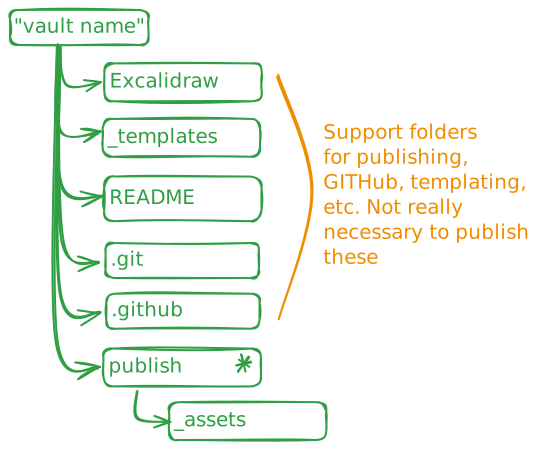
Previously, I used a publish directory to segregate public and private content. I have since removed that folder and implemented DATAVIEW_PUBLISHER. This allows me to use Dataview queries to dynamically generate index pages and content while keeping private information in the Internal/ folder (which is Git-ignored). This ensures my templates and source files (such as Excalidraw files) stay out of the public journal while remaining in the same repository.
Publishing to GitHub
I am using GitHub-Quartz-Obsidian to automatically publish my content to a public audience on a huge platform, complete with SSL and versioning control.
Links
- Obsidian Plugins
- Obsidian Help
- Timeblocking
- Time date Format
- Organizing Notes
- GitHub-Quartz-Obsidian
Tasks:
- Update obsidian layout to reflect most recent move to remove the publish folder and implement dataview-publisher